

A small-business budget is a month-by-month plan that maps your expected revenue against your costs and reserves, so you always know how much runway you have and what decisions you can actually afford to make. Without one, you're reacting. With one, you're steering.
Start here, right now:
- Estimate your monthly revenue (use a 3-month average if you have history; use a conservative guess if you're starting out).
- List every fixed cost you pay regardless of sales (rent, payroll, software subscriptions, insurance).
- Set a contingency line of a reasonable percentage of projected revenue before you spend anything discretionary.
Your immediate next step: open a blank spreadsheet in Microsoft Excel or Google Sheets, label 12 columns for each month, and start filling in those three rows today. Track actuals against your plan every month, no exceptions.
Key Takeaways
A working small-business budget requires a monthly operating plan, a short cash timing view, and a consistent review habit, and those three elements matter more than any sophisticated forecasting model.
| Point | Details |
|---|---|
| Start with cash | Track cash runway weekly; most small-business failures trace back to cash-flow shortfalls. |
| Build a monthly operating budget | Cover revenue, fixed costs, variable costs, owner draw, and a 5–10% contingency reserve. |
| Use the right tool | Excel or Google Sheets for early-stage; QuickBooks Online when transaction volume grows. |
| Review and reforecast regularly | Compare actuals to budget monthly; reforecast immediately when a major change hits. |
| Carlislebookkeeping | Provides monthly bookkeeping, QuickBooks Online support, and reports that make budget reviews reliable and fast. |
This article is general information, not a substitute for advice from a qualified financial advisor. Consult a qualified financial professional about your own circumstances before acting on anything here.
Table of Contents
- What is a business budget and why does your small business need one?
- What are the main types of business budgets?
- Which budgeting method should you use?
- How do you create a small-business budget step by step?
- What tools and templates make budgeting faster?
- How do you track budget performance and when should you reforecast?
- What are the most common small-business budgeting mistakes?
- A simple worked monthly budget example you can copy
- How can a bookkeeper help with your budget?
- How to incorporate tax planning and legal compliance costs into your budget
- How to communicate your budget to your team and stakeholders
- How to connect your budget to your business goals
- How to adjust your budget when conditions change unexpectedly
- The budget advice most small businesses don't follow
- Carlislebookkeeping makes budgeting part of your monthly routine
- Sources
What is a business budget and why does your small business need one?
A business budget is a structured, month-by-month allocation of projected revenue to expenses, owner compensation, taxes, and reserves. Think of it as a spending permission slip grounded in real numbers, rather than gut feeling.
The practical benefits go well beyond knowing your balance:
- Cash runway visibility. You can see, in advance, which months will be tight before they arrive, giving you time to cut costs or accelerate collections.
- Spending discipline. A budget forces every purchase to compete against a plan, which naturally filters out impulse spending.
- Tax readiness. Setting aside a tax reserve each month means April is never a crisis. The IRS expects quarterly estimated payments from most self-employed owners, and a budget makes that automatic.
- Decision gate for investments. Hiring, equipment, or a new marketing channel all look different when you can see the cash impact on paper before you commit.
- Lender and investor credibility. A clean, realistic budget signals that you run a managed business, not a guessing game.
Research on cash-flow problems consistently links a high proportion of small-business failures to cash-flow shortfalls, most of which a working budget would have flagged months earlier. Keeping your operating reserves in FDIC-insured accounts adds another layer of protection once you've built those reserves up.
What are the main types of business budgets?
Picking the right budget type saves you from building something too complex to use or too simple to be useful.
- Master budget. The consolidated view: it rolls up your operating budget, capital plan, and cash forecast into one document. The U.S. Chamber of Commerce describes it as integrating multiple forecasts and financial statements into a single plan, typically built annually and updated quarterly.
- Operating budget. The workhorse for most small businesses. It covers projected revenue and regular expenses on a monthly basis and is the one you'll review most often.
- Cash flow budget. A short-term timing view (4–8 weeks is practical) that shows when cash actually arrives and leaves, not just whether the month is profitable on paper.
- Capital expenditure budget. Tracks planned spending on assets: equipment, vehicles, leasehold improvements. Relevant when you're planning a significant purchase that will affect cash for months.
- Labor budget. Projects payroll, contractor costs, and benefits. Critical once headcount is your largest expense line.
For most small businesses, the operating budget and a short cash timing view are the two you can't skip. The others add value as you grow.
Which budgeting method should you use?
The method you choose shapes how much time budgeting takes and how accurate the result is. None of them is universally right.
Incremental budgeting takes last year's numbers and adjusts them by a percentage. It's fast, which is why stable businesses with predictable revenue tend to use it. The downside: it bakes in every inefficiency from the prior year without questioning whether that spending still makes sense.
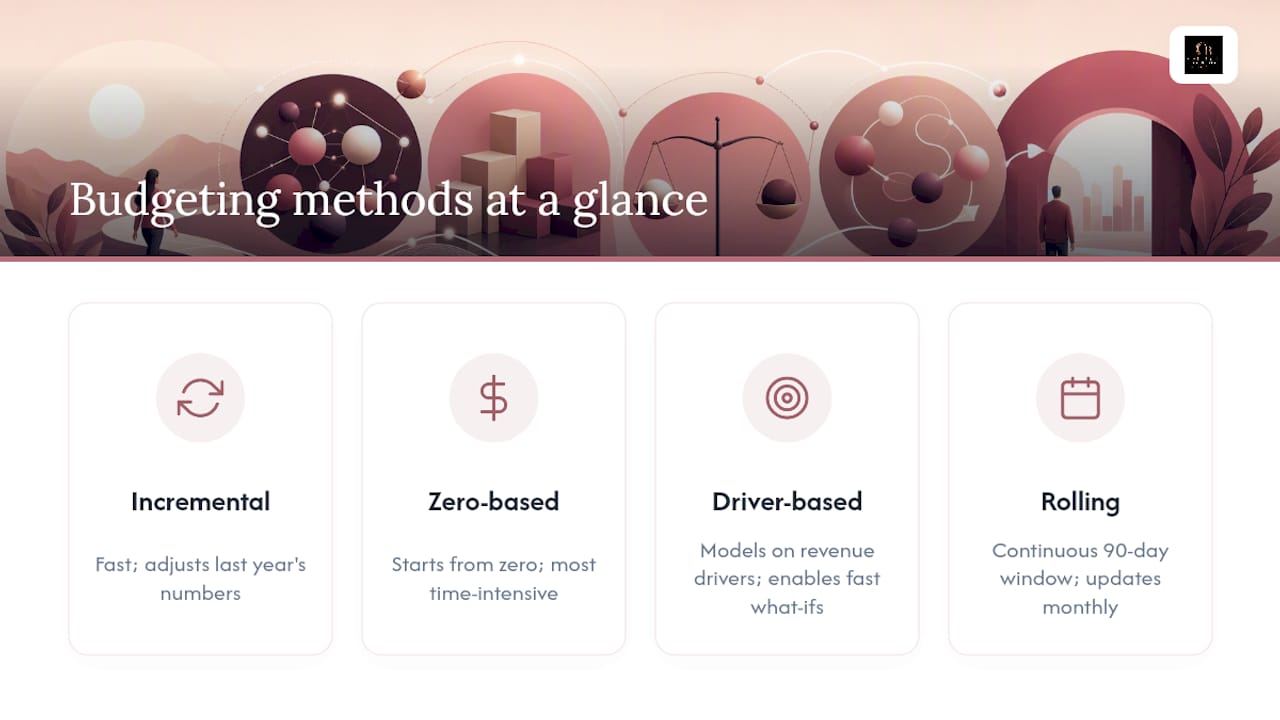
Zero-based budgeting (ZBB) starts from zero every cycle and requires every expense to be justified from scratch. It's the best tool for a cost-reduction push or a business reset after a rough year. It's also the most time-intensive, so most small businesses run a ZBB review once a year rather than every month.
Driver-based budgeting builds the model around the variables that actually drive your revenue and costs: units sold, average order value, conversion rate, headcount. Vantage recommends this approach specifically because it enables fast "what if" scenarios when conditions change, which is exactly what a small business needs.
Rolling forecasts replace the fixed annual budget with a continuously updated window, typically 90 days out. You drop the oldest month and add a new one each month. This keeps the budget current instead of letting it go stale by March.
A practical starting point for most small businesses: use incremental budgeting for your first annual plan, layer in driver-based assumptions for your top revenue line, and run a rolling 90-day cash forecast alongside it.
How do you create a small-business budget step by step?
Harvard Business School's guidance recommends starting with income and cash flow for the period, then allocating funds and updating as conditions change. Here's how that translates into practice:
- Estimate monthly revenue. Pull your last 3–6 months of actual sales. Calculate the average, then apply a conservative adjustment for seasonality. If you're pre-revenue, use your most defensible assumption and label it clearly as an estimate.
- List every fixed cost. Rent, payroll, loan payments, insurance, software subscriptions. These don't change with sales volume, so they're the easiest to capture accurately.
- Estimate variable costs. Cost of goods sold (COGS), payment processing fees, shipping, and sales commissions all scale with revenue. Set a ratio where you can: if COGS runs at 35% of revenue historically, use that as your rule.
- Add a contingency reserve. A line item of 5–10% of projected revenue, held back before any discretionary spending. Keep this in a separate FDIC-insured savings account so it doesn't get spent accidentally.
- Plan owner compensation explicitly. Pay yourself a set amount as a budget line, not whatever's left over. This is the single most common omission in small-business budgets.
- Build a simple monthly P&L. Revenue minus COGS equals gross margin. Gross margin minus fixed and variable operating costs equals net operating income. That's the core structure.
- Add a 4–8 week cash timing view. Profit and cash are not the same thing. If you invoice net-30, your December revenue may not arrive until February. The cash timing view catches that gap.
- Document your assumptions and assign ownership. Write down what you assumed for revenue growth, cost ratios, and timing. Assign one person to own each major budget line and schedule a monthly review date.
Pro Tip: Set a recurring calendar block on the first week of every month to close your books and compare actuals to your budget. Thirty minutes of review beats three hours of crisis management.
Salesforce's small-business budgeting guide recommends reviewing and updating the budget monthly, or more often when revenue or expenses are highly variable, which is sound advice for any business in its first two years.
What tools and templates make budgeting faster?
You don't need expensive software to build a working budget. The right tool depends on where you are in your business.
- Microsoft Excel. The most flexible option for custom models. Microsoft's template library includes downloadable business budget templates that track revenue, payroll, insurance, and utilities, with built-in chart and trend analysis features. Best for owners comfortable with formulas.
- Google Sheets. Free, cloud-based, and shareable in real time. Ideal for solo founders or small teams who need one person to update the budget and another to view it without emailing files back and forth.
- QuickBooks Online. Once your transaction volume grows, a spreadsheet starts to lag. QuickBooks Online connects directly to your bank accounts, categorizes expenses automatically, and generates budget-vs-actual reports without manual data entry. It also supports the "create budget in QuickBooks Online" workflow, where you set annual targets by account and the software tracks actuals against them each month.
| Tool | Best for | Key budget feature |
|---|---|---|
| Microsoft Excel | Custom models, offline use | Template library, Copilot chart analysis |
| Google Sheets | Collaboration, real-time sharing | Free, cloud-based, shareable links |
| QuickBooks Online | Growing businesses, automated tracking | Budget vs. actual reports, bank sync |
When to move from a spreadsheet to QuickBooks Online: if you're spending more than two hours a month reconciling transactions manually, if you have employees or contractors to pay, or if your accountant is asking for reports you can't easily produce, that's the signal. The Carlislebookkeeping resource center has additional templates and guides to help you get started.
How do you track budget performance and when should you reforecast?
A budget you never look at is just a document. The value comes from comparing what actually happened against what you planned, then acting on the gap.
Monthly review steps:
- Close your books for the month (reconcile all accounts).
- Pull actual revenue and expenses by category.
- Compare each line to the budget. Flag any variance greater than 10% for investigation.
- Determine whether the variance is a one-time event or a trend. A trend changes the forecast; a one-time event usually doesn't.
Essential KPIs to watch alongside the budget:
- Cash runway: how many months of operating expenses your current cash balance covers.
- Gross margin: revenue minus COGS, expressed as a percentage. A declining gross margin is an early warning sign.
- Burn rate: how much cash you're spending per month net of revenue (critical for startups).
- Accounts receivable aging: invoices over 30 days outstanding are a cash timing risk.
Vantage recommends pairing a short rolling forecast with a 4–8 week cash outlook to prevent cash surprises, and updating the full budget monthly, with a quarterly minimum for businesses with more stable revenue. When a major change hits (a large client lost, a sudden cost spike, a new product launch), reforecast immediately rather than waiting for the next scheduled review.
What are the most common small-business budgeting mistakes?
Most budgeting failures come down to a handful of recurring errors, and every one of them is fixable.
- Over-optimistic revenue. Building the budget around your best month, or your best-case scenario, sets up a shortfall by month three. Use your average, not your peak.
- Ignoring small recurring expenses. Software subscriptions, annual fees, and quarterly insurance premiums add up fast. Catalog every recurring charge, including the ones billed annually, and spread them across the months they affect.
- No review cadence. A budget reviewed once a year is decoration. Monthly is the minimum; weekly cash checks are worth adding when cash is tight.
- Mixing personal and business funds. This makes it impossible to know your true business costs and creates tax headaches. Separate accounts are non-negotiable.
- No budget owner. If everyone is responsible for the budget, no one is. Assign one person to own each major line and hold them accountable at the monthly review.
- Forgetting owner compensation. Paying yourself "whatever's left" means you have no real picture of profitability. Set a fixed owner draw as a planned line item.
The behavioral fix with the biggest impact: automate your tax set-aside and contingency transfer on the day revenue hits your account. Salesforce's guidance specifically recommends automating routine tasks to make budgeting disciplined rather than aspirational, and that's exactly right. Willpower is unreliable; automation isn't.
A simple worked monthly budget example you can copy
This sample is built for a service-based small business with $20,000 in monthly revenue. The percentages are directional starting points, not industry mandates.
How each line was built:
- COGS at 20%: based on direct service delivery costs (contractor time, materials). Adjust this ratio using your own historical data.
- Payroll at 35%: covers owner draw plus any staff. Directional allocation ranges suggest 25–35% for payroll as a starting guide.
- Marketing at 7%: a common starting point for service businesses; product businesses often run higher.
- Contingency at 5%: transferred to a separate savings account on the first of each month, before any discretionary spending.
To adapt this for your business, visit the Carlislebookkeeping resource center for downloadable templates you can copy directly into Google Sheets or Excel.
How can a bookkeeper help with your budget?
A bookkeeper doesn't just record transactions. When your books are clean and current, budgeting becomes a 30-minute monthly exercise instead of a half-day scramble.
Specific ways a bookkeeper supports your budgeting process:
- Monthly reconciliations ensure every transaction is categorized correctly, so your actuals are reliable when you compare them to the budget.
- Customized financial reports (P&L by category, cash flow statements) give you the exact data you need for a budget-vs-actual review without building reports from scratch.
- QuickBooks Online setup and cleanup means your chart of accounts matches your budget categories, so the software tracks what you actually care about.
- Cash timing views flag when receivables are lagging and when payables are clustering, so you can see a cash crunch before it arrives.
Consider a concrete scenario: a service business owner spending four hours a month manually categorizing transactions and reconciling accounts switches to a monthly bookkeeping service. The time savings alone free up capacity for client work, and the clean reports make the monthly budget review reliable enough to actually use for decisions. That's the shift from bookkeeping as a chore to bookkeeping as a decision tool.
The investment in professional bookkeeping tends to pay off once your monthly revenue exceeds the point where errors and missed deductions cost more than the service fee. For most small businesses, that threshold arrives earlier than expected. Explore Carlislebookkeeping's services to see what monthly support looks like in practice.
How to incorporate tax planning and legal compliance costs into your budget
Taxes and compliance costs are predictable, yet they catch small businesses off guard more than almost any other expense. The fix is treating them as fixed line items, not surprises.
Set aside federal and state income tax as a percentage of net profit each month. Budget that annual figure divided by 12 and transfer it monthly to a dedicated tax savings account.
Beyond income tax, budget explicitly for:
- Sales tax filing costs if you sell taxable goods or services in states where you have nexus.
- Payroll tax deposits (employer share of FICA) if you have employees.
- Business licenses and permits renewed annually.
- Legal and compliance fees: contract reviews, registered agent fees, annual state filings.
- Accounting and bookkeeping fees as a planned operating expense, not an afterthought.
A practical rule: if a compliance cost recurs annually, divide it by 12 and add that monthly accrual to your budget. Nothing about a $1,200 annual fee should feel like a surprise in the month it's due.
How to communicate your budget to your team and stakeholders
A budget that only you understand is a budget that only you'll follow. Getting your team aligned on the numbers changes how they make daily decisions.
Share the parts of the budget that are relevant to each person's role. Your operations lead needs to know the monthly cost ceiling for their department. Your sales team needs to know the revenue target and what hitting it means for the business. You don't need to share every line with everyone, but the people who influence a budget line should know what it is.
A few practices that work:
- Hold a brief monthly budget review meeting. Even 20 minutes to share actuals vs. plan keeps the team oriented and surfaces problems early.
- Frame variances as information, not blame. A 15% overage on marketing spend is a conversation about what drove it, not an accusation.
- Give department owners a budget number and the authority to manage within it. Ownership without authority is frustrating; authority without a number is chaos.
For external stakeholders (lenders, investors, or a board), a clean one-page budget summary with actuals alongside projections is usually enough. Holdings' financial planning guide draws a useful distinction here: the budget is tactical and monthly, while the financial plan is strategic and growth-oriented. Share the budget with operators; share the financial plan with investors.
How to connect your budget to your business goals
A budget disconnected from your goals is just a cost-control document. When you build it from your goals backward, it becomes a growth tool.
Start with your annual revenue target. Work backward to determine what sales volume, pricing, or client count gets you there. Then ask what it costs to deliver at that volume: headcount, marketing spend, infrastructure. That sequence, goals to drivers to costs, is the core of driver-based budgeting and it's what separates a strategic budget from a spreadsheet of last year's numbers plus 5%.
Practically, this means your budget should have a line for every major goal. Launching a new service? Budget the development cost, the marketing spend, and the expected revenue contribution by month. Hiring a second employee? Budget the salary, payroll taxes, and onboarding costs, and note the month the revenue impact is expected to offset them.
Review your goals alongside your budget at least quarterly. If a goal has shifted, the budget should shift with it. A budget that no longer reflects your priorities is actively misleading.
How to adjust your budget when conditions change unexpectedly
No budget survives first contact with reality unchanged. The goal isn't a perfect forecast; it's a plan you can update quickly when things shift.
When a major change hits, whether it's a large client leaving, a supply cost spike, or a broader economic slowdown, run a revised forecast immediately. Don't wait for the next scheduled review. A rolling 90-day forecast is the most practical tool here: update the next three months with your best current assumptions, and use that view to make near-term decisions.
Specific adjustment strategies:
- Revenue shock: cut discretionary spending first (marketing, travel, software), then reassess variable costs. Protect payroll as long as cash runway allows.
- Cost spike: identify whether the increase is temporary or structural. A temporary spike (a one-time repair, a seasonal cost) doesn't require a budget revision. A structural one (a permanent rent increase, a new compliance cost) does.
- Economic slowdown: run a downside scenario at 70–80% of your base revenue assumption and identify which costs you'd cut at that level. Knowing your contingency plan in advance means you can act in days, not weeks.
The U.S. Chamber of Commerce recommends starting with a simple 12-month model and adding scenario planning periodically. That's the right sequence: get the base model working first, then build the muscle for scenario analysis.
The budget advice most small businesses don't follow
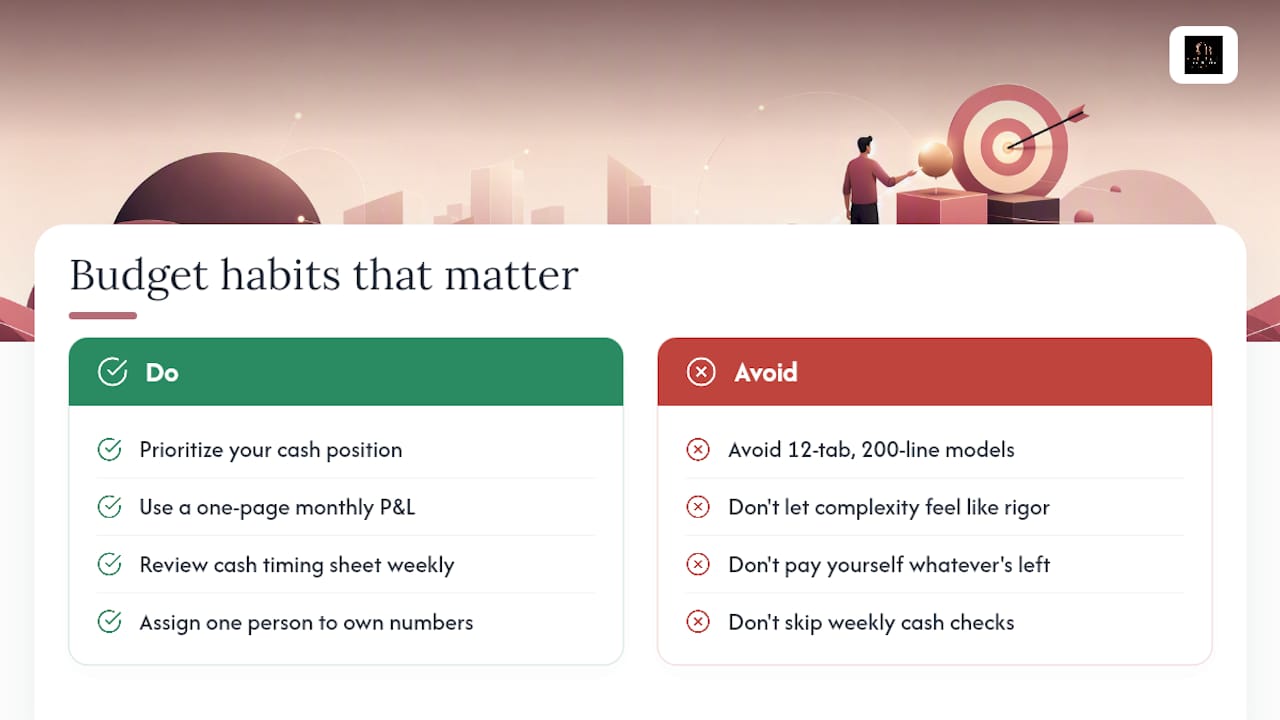
Most articles on small business budgeting will tell you to build a detailed annual plan, track every category, and review it monthly. That's all correct. But the advice that actually changes outcomes is simpler and less glamorous: prioritize your cash position above everything else, and keep the budget simple enough that you'll actually use it.
A 12-tab model with 200 line items that gets opened twice a year is worse than a one-page monthly P&L and a cash timing sheet that you review every week. The complexity feels like rigor, but it's usually avoidance. The businesses I see make real progress with budgeting are the ones that commit to three things: a monthly operating budget they can close in under an hour, a weekly cash check (even just a bank balance review), and one person who owns the numbers.
Zero-based budgeting and rolling forecasts are genuinely useful tools, but they're second-order improvements. Get the basic monthly review habit locked in first. Once that's automatic, add the sophistication.
The other thing most guides understate: owner compensation is not optional. Paying yourself whatever's left at the end of the month means you have no real picture of whether the business is profitable. Set a fixed owner draw, budget it as a cost, and measure profitability against that. If the business can't support a reasonable owner salary, that's the most important thing your budget can tell you.
Carlislebookkeeping makes budgeting part of your monthly routine
Clean books are the foundation of a budget you can trust. Carlislebookkeeping provides monthly bookkeeping, QuickBooks Online setup and support, and customized financial reporting for entrepreneurs and growing small businesses across Orange County, San Diego County, San Bernardino County, Riverside County, and Los Angeles County.
Every month, your accounts are reconciled, your expenses are categorized, and your reports are ready for your budget review, without you spending a weekend on it. QuickBooks Online budget-vs-actual reports become genuinely useful when the underlying data is clean and current. That's what Carlislebookkeeping delivers: the organized financial foundation that makes your budget a real decision tool instead of a once-a-year exercise.
View service options and pricing to find the right level of support for your business, or explore the bookkeeping services page to see exactly what's included each month.
Sources
- Small Business Budgeting Guide: How to Build a Financial Plan | U.S. Chamber of Commerce
- Let’s Talk Dollars: How to Create a Budget For Your Small Business | Salesforce
- Beancount